Local customers are searching for businesses like yours every day and Google Local Service Ads put you right at the top of their results. With this powerful ad platform, you can reach high-intent customers in your area, build trust with verified listings, and pay only for real leads. Our team helps you set up, optimize, and manage your Local Service Ads so you get more calls, bookings, and loyal clients. Turn every local search into an opportunity to grow your business faster and smarter.
What Are Google Local Services Ads?
Imagine your business popping up right at the very top of Google the moment a customer in your neighborhood needs you. That’s the power of Google Local Services Ads, or LSAs for short. These simple, powerful ads are designed specifically for local service businesses from plumbers to real estate agents to connect with customers who are ready to book a job. They show up above regular search ads and feature your company’s name, phone number, and those all-important customer reviews.
You Only Pay for Real Connections
Unlike regular ads where you pay for clicks, LSAs use a pay-per-lead model. This means you only pay when a potential customer actually calls or messages you directly from the ad. It’s a straightforward way to manage your budget and focus on getting real business.
How Do They Work?
Google shows your ad to people searching for services you offer within your specific local targeting area. Your ad’s visibility is influenced by factors like your proximity to the customer, your review score, and how quickly you respond to inquiries. It’s all designed to build trust and drive qualified leads right to your phone.
Are You Eligible? Verification, Background Checks, and the Google Verified Badge
Before you can start getting leads with Google Local Services Ads, you need to make sure your business qualifies and can pass Google’s screening process. This is a crucial step that helps build trust with customers right from the start. It might sound like a lot, but it’s a straightforward process that shows everyone you’re a professional they can count on. Let’s break down the 3 key parts of getting approved.
Who Is Eligible for LSAs?
Local Services Ads are available for a wide range of service categories across the USA, from home services like HVAC and roofing to professional services like law and real estate. The list is always growing, but some industries do have specific state exceptions. The quickest way to know for sure is to start the sign-up process, where Google will confirm your eligibility based on your business type and location. If you’re in a qualifying category, you’re ready for the next step.
The 3 Steps of Verification
Once you confirm your eligibility, Google will ask you to complete a verification process to earn your badge. This usually involves 3 main checks:
- Background Check: Google works with a trusted partner to run background checks on the business owner and sometimes the employees who serve customers.
- License and Insurance Verification: You’ll need to show proof that your business has the required licenses and insurance for your industry and state.
- Review Check: Google looks at your existing reviews online to ensure you have a solid reputation.
This process can take anywhere from a few days to a couple of weeks, so it’s best to get your documents ready early.
Why the Google Verified Badge Matters So Much
After you pass these checks, you earn the Google Verified badge. This little shield next to your name is a huge trust signal for customers. It tells them that Google has vetted your business, which can make them much more likely to choose you over a competitor. This badge is more than just a decoration, it’s a powerful tool that directly impacts your ad’s ranking factors and your ability to win high-quality, pay-per-lead customers.
How Do LSAs Work Behind the Scenes?
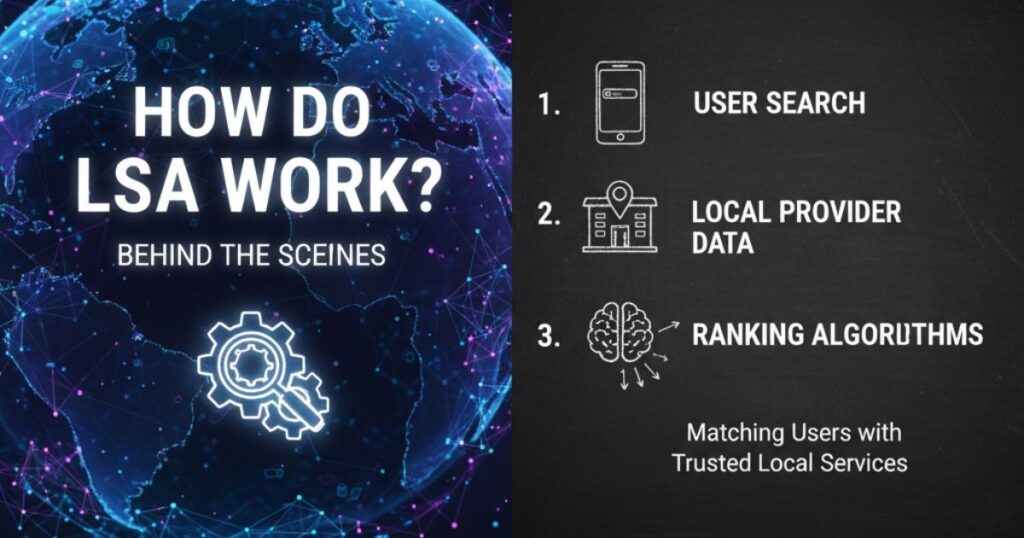
Google Local Services Ads seem simple on the surface, but how does Google decide when and where to show your ad? It’s not random magic. Understanding the basics of how LSAs work will help you make smarter decisions to improve your visibility and get more leads. Think of it like a friendly competition where the most trustworthy and responsive businesses get the top spots.
How Google Decides to Show Your Ad
When a customer searches for a service you offer in your area, Google’s system looks at several businesses to decide which ones to show. It’s not just about who has the biggest budget. The 3 most important ranking factors are:
- Proximity: How close your business is to the customer.
- Reviews: Your overall star rating and the number of reviews you have.
- Responsiveness: How quickly you answer calls and reply to messages.
Other details like your business hours, how complete your profile is, and even your dispute rate also play a part.
What Counts as a “Lead” and How Billing Works
With LSAs, you only pay per lead, but what exactly is a lead? A lead is when a customer contacts you directly through your ad by phone call or message. For some industries, it can also include direct bookings. You get charged for these valid connections, not for someone just viewing your ad. This model ensures your money is spent on potential customers who are actively reaching out. You can manage and track every lead right from your LSA dashboard.
What You Can Control Starting Today
While you can’t change your business address to be closer to every customer, you have a surprising amount of control over your success. You can focus on improving your review score by asking happy customers for feedback. You can also work on your responsiveness, aiming to answer every call and message as fast as possible. These actions directly influence your ad’s performance and are key to effective lead management.
Step-by-Step Setup
Alright, you’ve confirmed you’re eligible and you understand how LSAs work. Now for the fun part: building your profile! This is where you tell Google exactly what you do and who you serve. Getting this right from the start is one of the most important things you can do for effective lead management. This simple 5-step process will have you ready to go live.
Create Your Profile
First, you’ll complete the initial sign-up and profile setup. This involves adding your business name, phone number, and website. You’ll also want to upload a few high-quality photos of your work or team. This helps customers get a feel for your business before they even call.
Dial In Your Targeting and Services
Next, you’ll define your local targeting. Pinpoint the exact cities or zip codes you serve. Be specific! Then, select your job types from the list Google provides. This tells Google which customer searches are a good match for you. Finally, set your business hours so customers know when you’re available for bookings.
Turn On Trust and Messaging
Connect your Google Business Profile to pull in all those great reviews you’ve earned. This is also when your Google Verified badge will appear once your checks are complete, adding a huge layer of trust. Don’t forget to enable messaging so customers have one more easy way to reach you.
Set Your Budget and Go Live
Decide how much you want to spend each week based on the number of leads you can handle. You can adjust this anytime. Once you add your billing info, you’re ready to launch your first Local Services Ads campaign.
Pre-Launch Checklist
Before you hit “go,” run through this quick 4-point check:
- Are your service areas set correctly?
- Are your most important job types selected?
- Is your Google Business Profile connected to show reviews?
- Have you uploaded at least 2-3 clear photos?
With your profile live, it’s time to learn how to manage your budget and climb the rankings.
How Much Should I Budget? Realistic Costs and CPL Expectations
One of the best things about Google Local Services Ads is that you are in complete control of your budget. But how much should you actually spend? Instead of picking a random number, a little planning can help you set a smart budget that fuels your growth without breaking the bank. It’s all about knowing what a lead is worth to you and working backward from there.
Start With Your Capacity, Not a Guess
Before you think about costs, ask yourself: how many new jobs can my team realistically handle each week? If you get 10 great leads but only have time for 3, you’re wasting money. Start with a manageable number of weekly leads you want, whether it’s 5, 15, or 50. This is your target. Your budget should be based on what your business can actually manage and convert into happy, paying customers.
Estimate Your Cost Per Lead
The pricing for a lead isn’t the same for everyone. Your cost per lead depends on 3 main things: your industry, your metro area, and even the seasonality of your work. A plumbing lead in a major city might cost more than a landscaping lead in a smaller town. A good starting point is to use Google’s budget calculator, but expect to see a range..
You can set a simple starting budget with this formula:
Weekly Budget = Target Weekly Leads x Estimated CPL
For example, if you want 10 leads a week and estimate each will cost $30, your starting weekly budget is $300.
Tune Your Budget for Profit
Once your ads are running for a few weeks, you’ll see your actual CPL. Now you can start making adjustments. If your lead management is strong and you’re closing a lot of jobs, you might decide to increase your budget to get more bookings. If your CPL is too high, you can work on improving your ranking factors like getting more reviews and boosting your responsiveness which can help lower your costs over time.
Setting a budget is just step one. Now, let’s look at how you can improve your rank to get more leads for less money.
What Affects Your Rank? The 6 Signals You Can Actually Improve
Getting your Local Services Ads to show up more often doesn’t require a secret decoder ring. Google wants to connect its users with the best local pros, and it uses a few common-sense ranking factors to decide who gets the top spots. While you can’t control everything (like where your customer lives), you have a surprising amount of power over these 6 key signals. Mastering them is your ticket to more leads and better pay-per-lead value.
1. Your Reviews Are Your Reputation
Customers trust stars and stories from their neighbors. Aim for a steady stream of new, positive reviews. A great goal is to follow up with every customer within 24-48 hours of finishing a job to ask for their feedback. More high-quality reviews signal to Google that you’re a trusted choice.
2. Responsiveness Rewards the Swift
How fast you answer calls and messages is a huge factor. Try to respond in under 60 seconds! Quick replies show Google you’re serious about customer service and ready for more bookings. Missing calls or letting messages sit can quickly drop your rank.
3. Profile Completeness Shows You Care
A half-finished profile looks sloppy. Fill out every single section: add at least 3-5 great photos, double-check your local targeting areas, and make sure all your services are selected. A complete profile is an easy win that builds instant trust.
4. Your Business Hours Matter More Than You Think
Are your business hours accurate and up-to-date? Google prioritizes businesses that are open and available to help customers right now. If you’re open on weekends, make sure your profile reflects that to capture those urgent jobs.
5. Proximity Is King
You can’t move your office for every lead, but you can ensure your service areas are perfectly defined. Don’t over-promise your reach. Tightly defining where you work helps Google match you with the most relevant local customers.
6. Keep Your Dispute Rate Low
Constantly disputing leads tells Google your targeting might be off. While you should absolutely challenge invalid leads, a high dispute rate can be a red flag. Fine-tuning your job types and service areas can help reduce junk leads from the start.
For detailed playbooks on improving these signals, resources like bosthelp offer great templates to get you started. Now, let’s talk about building a review engine that works on autopilot.
Can I pause my ads? Reviews That Move the Needle
In the world of Google Local Services Ads, your reviews are like your superpower. They are one of the most important ranking factors because they show both Google and potential customers that you do great work. A steady flow of positive feedback builds immense trust and can directly lead to more bookings. But you can’t just hope for good reviews, you need a simple, repeatable plan to get them.
Why Every Single Review Matters
Think of each review as a vote of confidence. Not only do they help new customers choose you, but they also tell Google that your business is active and respected. Google pays close attention to review velocity how often you get new reviews. A business with 20 reviews spread out over a year looks more current and reliable than one with 20 reviews from three years ago. Your goal should be to build a review engine that consistently brings in fresh feedback.
Ask the Right Way, at the Right Time
The secret to getting more reviews is to ask! But timing is everything. The best moment to ask is within 24-48 hours of completing a job, while the excellent service is still fresh in your customer’s mind. A simple 3-step follow-up can work wonders:
- Send a thank-you message or email after the job is done.
- In that message, include a direct link to your Google Business Profile review page.
- Gently mention how much their feedback means to you and other customers.
Using proven review templates, like those you can find on sites like bosthelp, makes this process quick and easy.
Turn All Feedback into Fuel
Don’t fear the occasional bad review. Embrace it. Responding professionally to negative feedback shows you care about customer satisfaction and are committed to improving. A thoughtful response can even turn a negative situation into a positive one. Aim for a “10 reviews in 30 days” sprint to kickstart your momentum and watch how it improves your lead management and boosts your rank.
Now that you have a plan to collect reviews, let’s talk about how to handle the leads they bring in.
Lead Management That Wins
Getting a lead from your Google Local Services Ads is only half the battle, turning that lead into a paying customer is how you win. Excellent lead management isn’t just about answering the phone, it’s about creating a smooth, professional experience from the very first contact. This is how you maximize the value of every pay-per-lead dollar and boost your ranking factors at the same time.
Pick Up the Phone… Fast!
Your responsiveness is critical. Aim to answer every single call in under 60 seconds. When a potential customer is calling, they are ready to solve a problem now. If you miss their call, they will immediately move on to the next business on the list. A simple 3-step call script can help anyone on your team sound professional and stay on track:
- Greet them warmly and confirm their name.
- Listen to their needs and confirm you can help.
- Schedule the appointment or explain the next step.
Message Like a Pro
For customers who prefer messaging, a quick and helpful reply is just as important as a fast phone call. Set up automated replies to instantly acknowledge their message, letting them know you’ll be with them shortly. Then, have a real person follow-up within 5-10 minutes. Use clear, friendly language, and don’t be afraid to use labels or tags in your LSA dashboard to keep track of each conversation’s status.
Book the Job on the Spot
The goal of every conversation is to get the job on the calendar. Don’t end a call or message exchange with a vague “we’ll call you back.” Be ready to schedule bookings immediately. This shows the customer you are organized and serious about their business. A quick booking reduces the chance they’ll keep shopping around and helps lower your dispute rate, as you’re converting leads into actual work.
Of course, not every lead will be a perfect fit. Next, we’ll cover what to do when you get a lead that isn’t right for your business.
Disputes and Refunds: What You Can Win
Even with perfect lead management, you’ll sometimes get a call or message that isn’t a real lead. The good news is that Google’s pay-per-lead model allows you to file disputes for these invalid leads. Winning these disputes means you get a credit back for the charge. It’s a fair system, but you need to know the rules to use it effectively.
What Is a Valid Dispute?
You can request refunds for leads that clearly fall outside the scope of what you paid for. This isn’t for customers who changed their mind, it’s for contacts that were never a legitimate opportunity in the first place. Examples include spam calls, a job you don’t offer, or a customer located far outside your service area. Keeping your dispute rate healthy is important, as a very high rate might signal to Google that your local targeting is off, which can affect your ranking factors.
4 Common Cases You Can Win
While Google has a full list, here are 4 of the most common types of invalid leads you can successfully dispute:
- Wrong Service: The customer is asking for a job type you don’t have listed in your profile.
- Wrong Location: The customer is outside your set service areas.
- Spam or Sales Call: The person is trying to sell you something, not hire you.
- Duplicate Lead: The same customer contacts you twice for the same job within 15 days.
The 3-Step Dispute Checklist
To win your disputes, you need to act fast and provide clear evidence. Follow this simple 3-step checklist for every invalid lead:
- Listen and Document: During the call, note why it’s invalid. Is it the wrong service? Write it down. Save screenshots of irrelevant text messages.
- Submit Within 48 Hours: Log into your LSA dashboard, find the lead, and select “Dispute.” The faster you submit, the better.
- Provide Clear Notes: Briefly explain why the lead is invalid. Use a simple reason like, “Customer requested a service we do not offer,” or, “Spam call selling marketing services.” Call recordings are automatically attached, which helps your case.
Knowing which leads to dispute helps protect your budget. Next, let’s look at how to track your results to see what’s really working.
Reporting and KPIs That Matter
Running Google Local Services Ads without checking your numbers is like driving with your eyes closed. The LSA dashboard gives you powerful reporting tools to see exactly how your ads are performing. But instead of getting lost in data, you should focus on a few key performance indicators (KPIs) that tell you what’s really working. Let’s look at what to track in your first month versus what matters long-term.
Early Signals to Watch
In the first few weeks, you’re looking for signs of life. Don’t worry about profit just yet. Instead, focus on these 3 early indicators to see if your campaign is healthy:
- Impressions and Views: Is your ad being seen by potential customers?
- Leads: Are people actually calling or messaging you?
- Response Time: Are you answering those leads quickly?
During this time, you can calculate your initial Cost Per Lead to see what you’re paying for each connection.
CPL = Total Spend ÷ Total Leads
Business Outcomes
After about 3 months, you can start measuring the numbers that truly impact your bottom line. These KPIs tell you if your investment is paying off.
- Close Rate: What percentage of your leads are turning into actual jobs?
- Cost Per Booked Job: How much does it cost you to secure one paying customer?
- Dispute Rate: Are you getting a lot of invalid leads?
Your CPB is a crucial metric for understanding profitability.
CPB = Total Spend ÷ Total Booked Jobs
Track What Truly Matters with Labels
The most powerful tool in your dashboard is the ability to mark leads as “booked.” This is how you track your true return. Go one step further and use labels or tags to categorize your jobs. You can create tags for different service types (e.g., “Water Heater Repair” vs. “Drain Cleaning”) to see which services are most profitable through LSAs. This simple step transforms basic lead management into smart business intelligence, helping you focus your budget where it works best.
Tracking your results shows you the value LSAs bring. But how do they fit with other types of ads? Let’s explore that next.
LSA vs. Google Ads: When to Use Both
So, you’re running Google Local Services Ads and things are going well. But then you hear about traditional Google Ads and wonder, “Should I be using those, too?” The answer is often yes! Think of them as two different tools in your toolbox. They work differently but can be used together to help your business grow even faster.
What LSAs Do Best: Capturing “Ready to Buy” Customers
Local Services Ads are designed for one main purpose: to generate immediate leads for specific services. Because they use a pay-per-lead model and appear at the very top of search results, they are amazing at capturing customers with high intent. These are people searching for something like “plumber near me” who are ready for a booking right now. The LSA format, with your photo and reviews, is built for quick trust and action. It’s simple, direct, and focuses on your core service areas.
What Google Ads Does Better: Reaching a Broader Audience
Traditional Google Ads, which use a pay-per-click (PPC) model, offer far more control and flexibility. With Google Ads, you choose the exact keywords you want to target. This means you can reach people who are still in the research phase, not just those ready to buy. For example, you could run an ad targeting the search term “how much does it cost to replace a roof?” This lets you introduce your business to customers earlier in their journey. You can also use Google Ads to promote special offers or target areas outside your immediate local targeting.
The Smart Combo Plan: Dominate Page One
Here’s a powerful 2-part strategy:
- Use LSAs for high-intent, bottom-of-funnel leads. This is your primary tool for getting your phone to ring today with customers who need your main services.
- Use Google Ads for everything else. Target broader keywords, educate potential customers, promote unique services not covered by LSA job types, and build brand awareness.
By running both, you can appear multiple times on the first page of Google. A customer might see your Google Ad while researching, and then see your LSA with the Google Verified badge when they’re finally ready to make a call. This powerful combination improves your visibility and covers all stages of a customer’s search.
Now, let’s wrap this up and get you started on your path to success.
Common Pitfalls and How to Avoid Them
Google Local Services Ads are powerful, but they aren’t a “set it and forget it” tool. Many businesses make small, avoidable mistakes that cost them leads and hurt their rankings. By knowing what these common pitfalls are, you can sidestep them easily and keep your ads performing at their best. Think of this as your cheat sheet for LSA success.
Pitfalls That Cost You Money and Rank
The biggest mistakes usually come from neglect. Forgetting to update your profile, letting calls go to voicemail, or ignoring your reports can quickly turn a profitable ad campaign into a waste of your budget. These little things add up, causing your rankings to drop and your cost per lead to rise. Good lead management is about creating good habits from day one.
Fix It Fast: Simple Solutions to Big Problems
Here are four of the most common mistakes and how to fix them in just a few minutes:
- Pitfall: Missing calls and letting messages wait.
- Fix: Aim to answer every call in under 60 seconds. Respond to messages within minutes, not hours. This directly boosts your responsiveness score.
- Pitfall: Forgetting to ask happy customers for feedback.
- Fix: Send a review request link within 24-48 hours of every completed job. More fresh reviews are fuel for your rank.
- Pitfall: Having an incomplete or outdated profile.
- Fix: Once a month, review your profile completeness. Check that your service areas and job types are still accurate.
- Pitfall: Letting bad leads drain your budget.
- Fix: Dispute invalid leads immediately. A high dispute rate can be a problem, but never paying for junk leads is smart business.
Build Good Habits for Long-Term Success
Success with LSAs comes down to consistent effort. Make it a weekly habit to log in to your dashboard for just 15 minutes. Check your leads, mark new bookings, and review your reporting. By building these simple routines, you stay in control of your ads and ensure they are always working hard to grow your business.
Now, let’s wrap everything up and outline your next steps to becoming an LSA pro.
Conclusion
If you want your business to be seen by real customers ready to take action, Google Local Service Ads are a game-changer. They put your services in front of the right people at the perfect time when they’re searching for what you offer. By learning how to turn local searches into paying customers with Google Local Service Ads, you can build trust, earn more leads, and grow your business faster. It’s not just about being found, it’s about being chosen.
FAQs
You are in complete control of your How much do I have to spend? You can start with as little as $50 a week and adjust it anytime based on how many leads you can handle, making it flexible for any size business.
Focus on improving your responsiveness by answering calls in under 60 seconds and getting more positive reviews. These are two of the biggest factors that tell Google to send more leads your way.
If your CPL seems high, review your local targeting and selected job types to ensure they are precise. A high CPL can sometimes mean your targeting is too broad, so tightening it up can bring costs down.
You can start getting leads within 24-48 hours of your profile going live. However, it typically takes about 7-30 days to gather enough data to see clear trends in your lead flow and costs.
Yes, you can pause your ads at any time directly from your LSA dashboard. This is a great feature for when you go on vacation or your schedule for bookings gets completely full.